What Valor Software learned on a 20-year-old enterprise platform: fewer review rounds, far less rework, and why we kept Figma
A client asked us a reasonable question last year. If an AI can read our design system and write front-end code, why are we still paying designers to draw screens in Figma? We are Valor Software, and the product in question is one of the largest B2B platforms in its market, with more than twenty years of history behind it: acquired modules, three generations of front-end framework, and a design language that drifted every time a team shipped in a hurry. This article is about how we answered, what we changed, and what it gave us.
The problem
On a platform this old, the expensive part of design is not drawing. It is discovering the details too late.
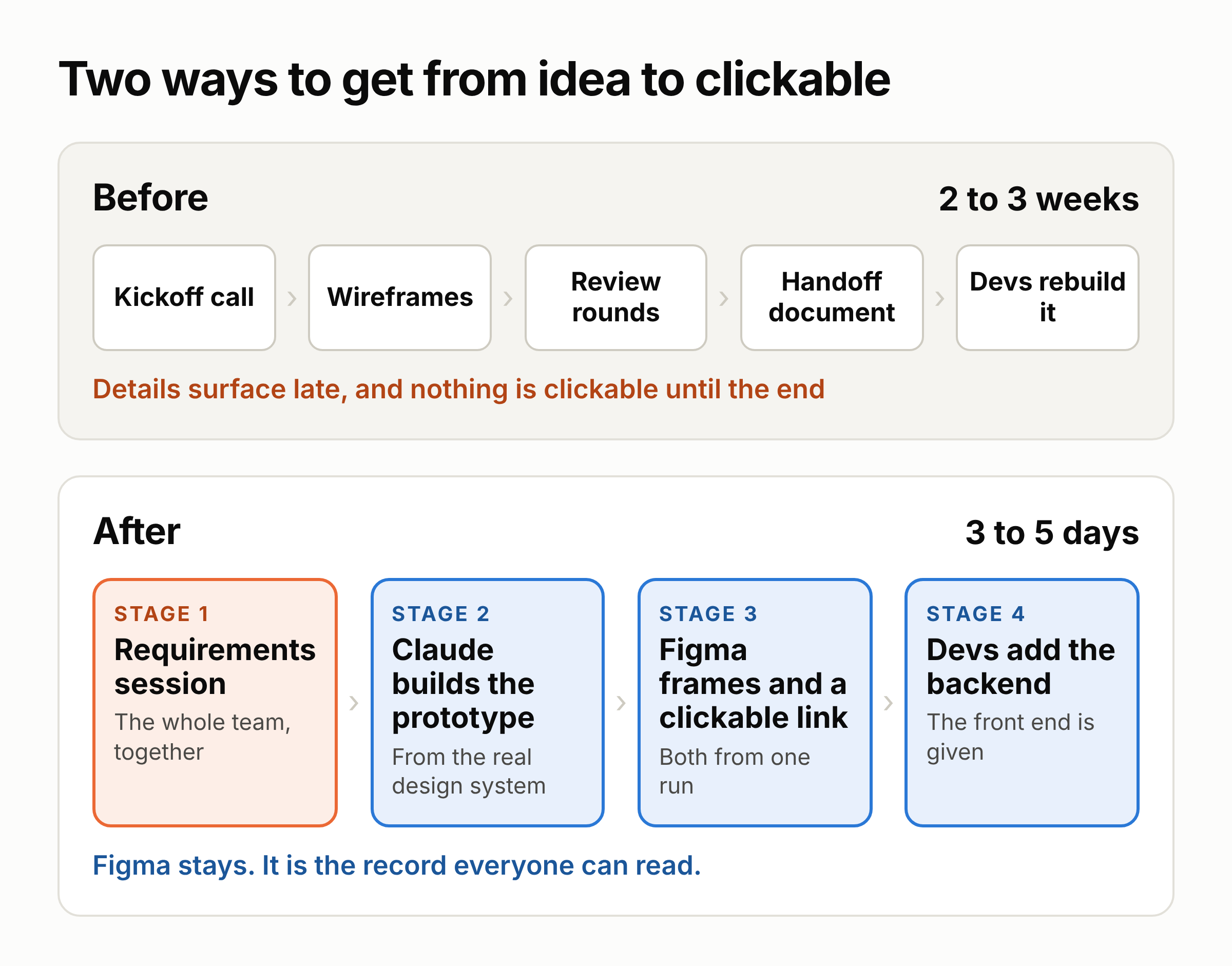
A kickoff used to end with "great, we’ll work out the details in Figma." That sentence is where the cost hides. The partial-failure state shows up in review round three. The pagination limit shows up in QA. The component we drew turns out not to exist in the library, and we learn that on handoff day. Nothing was clickable until the very end, so the people who knew why a rule existed rarely saw it in time.
Before and after
We did not replace Figma, and we kept it on purpose. On a product this old, the Figma file is the thing that survives: versioned, commentable, and readable by a new developer, a QA engineer, or the client’s own team two years from now. Betting that history on a chat transcript and a git branch is a risk nobody was paying us to take.
What we changed is where the detail gets settled. It now happens at the start, with the whole team in the room, and then Claude builds a prototype from that. Building the process took a quarter, most of it spent cleaning up the component library.
What we did
Stage 1: settle the details in one session
Before anything is drawn, the people who will build the feature meet for a short working session: product, design, front-end and QA. The result is a one-page brief.
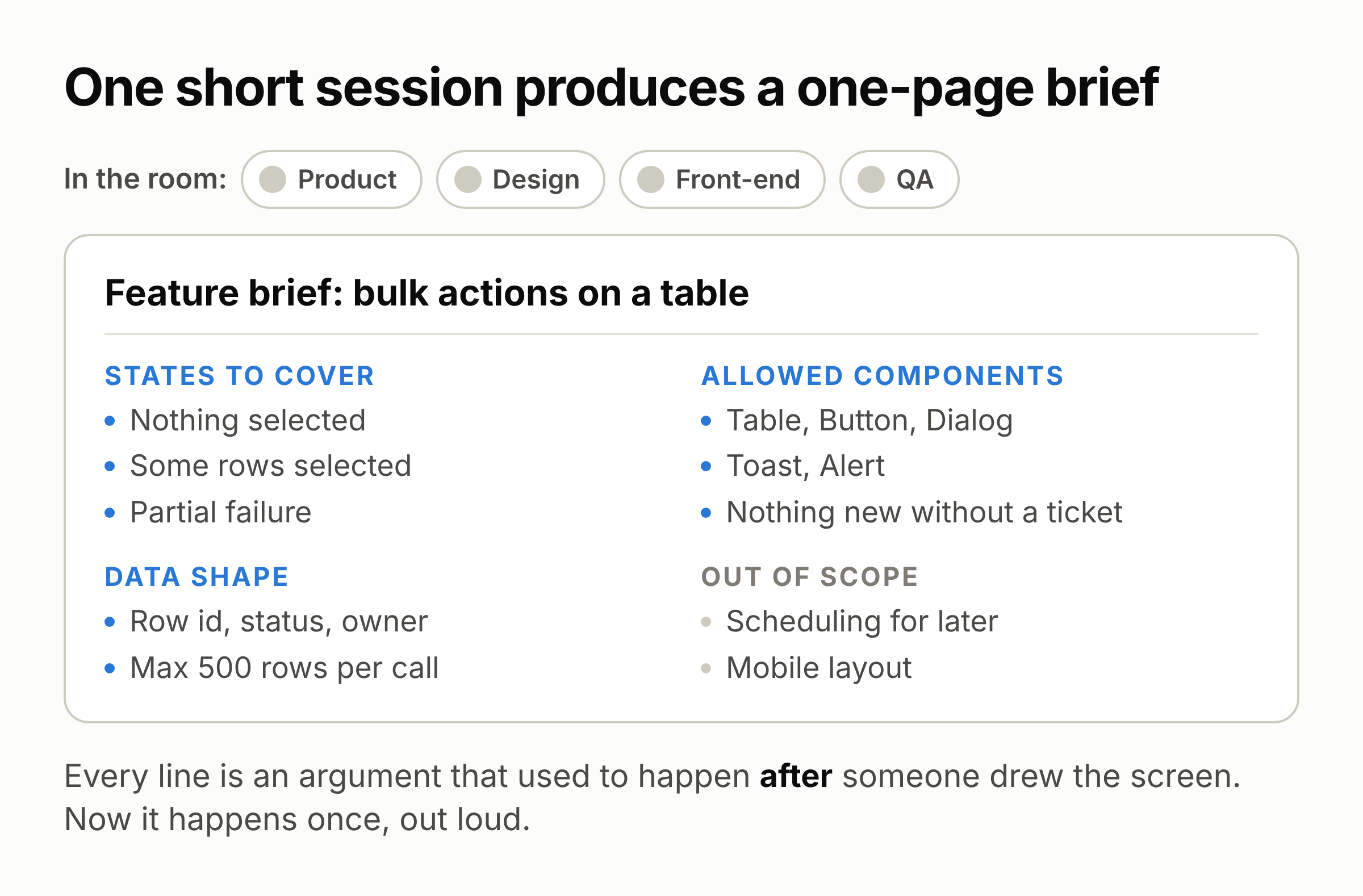
We did not invent this. It is the Three Amigos workshop that teams doing behaviour-driven development have used for years: one person to request, one to suggest, one to protest, usually product, a developer and a tester, kept to 30 or 45 minutes. If it runs long, the feature is too big. The tester asks about partial failure while the answer is still free. The front-end lead says "that component doesn’t exist" before anyone draws it.
With AI, the brief became more than a record. It is now also the input. Engineers arrived at the same idea on their own and call it spec-driven development. GitHub’s Spec Kit turns it into three steps, specify, plan and tasks, on the argument that "code is really not the best medium for requirements negotiation." Addy Osmani’s guide to writing specs for AI agents says much the same from the practitioner side: write it like a product requirements document, state the boundaries clearly, and keep it versioned.
Our one addition is small. We put a closed list of components in the brief. It stops generated screens from quietly forking a design system that already spent a decade fragmenting on its own. If something is missing, that becomes a question for a person, never an invented colour value.
Stage 2: let Claude build from what already exists
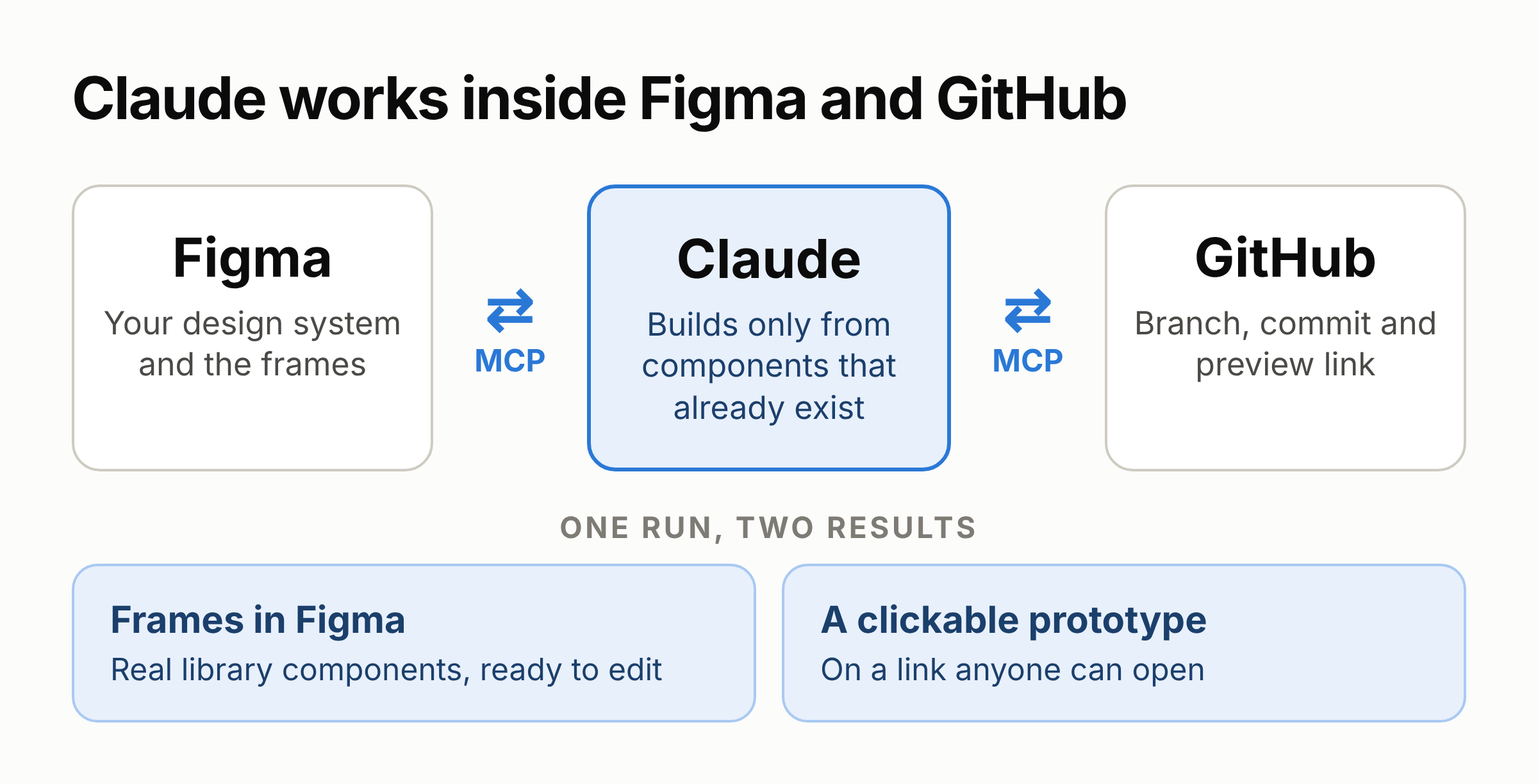
Claude does not make up interfaces from imagination. It reads the client’s published component library through the Figma connection, builds screens from components that already exist, and writes the result into the two places the team already works in.
The connection is called MCP, a standard way for an AI to work directly inside other tools. Figma’s version comes in two flavours, a local one through the desktop app and a remote one at mcp.figma.com/mcp, and in supported apps it can now write to the canvas instead of only reading from it (Figma’s guide, the remote-MCP announcement). On the other side, the GitHub connection handles the branch, the commit and the pull request.
None of this is exotic. Connecting the tools took an afternoon; it is configuration, not engineering. The real cost came earlier: six weeks of cleaning up the design system so there was something worth generating from.
Stage 3: one run, two results
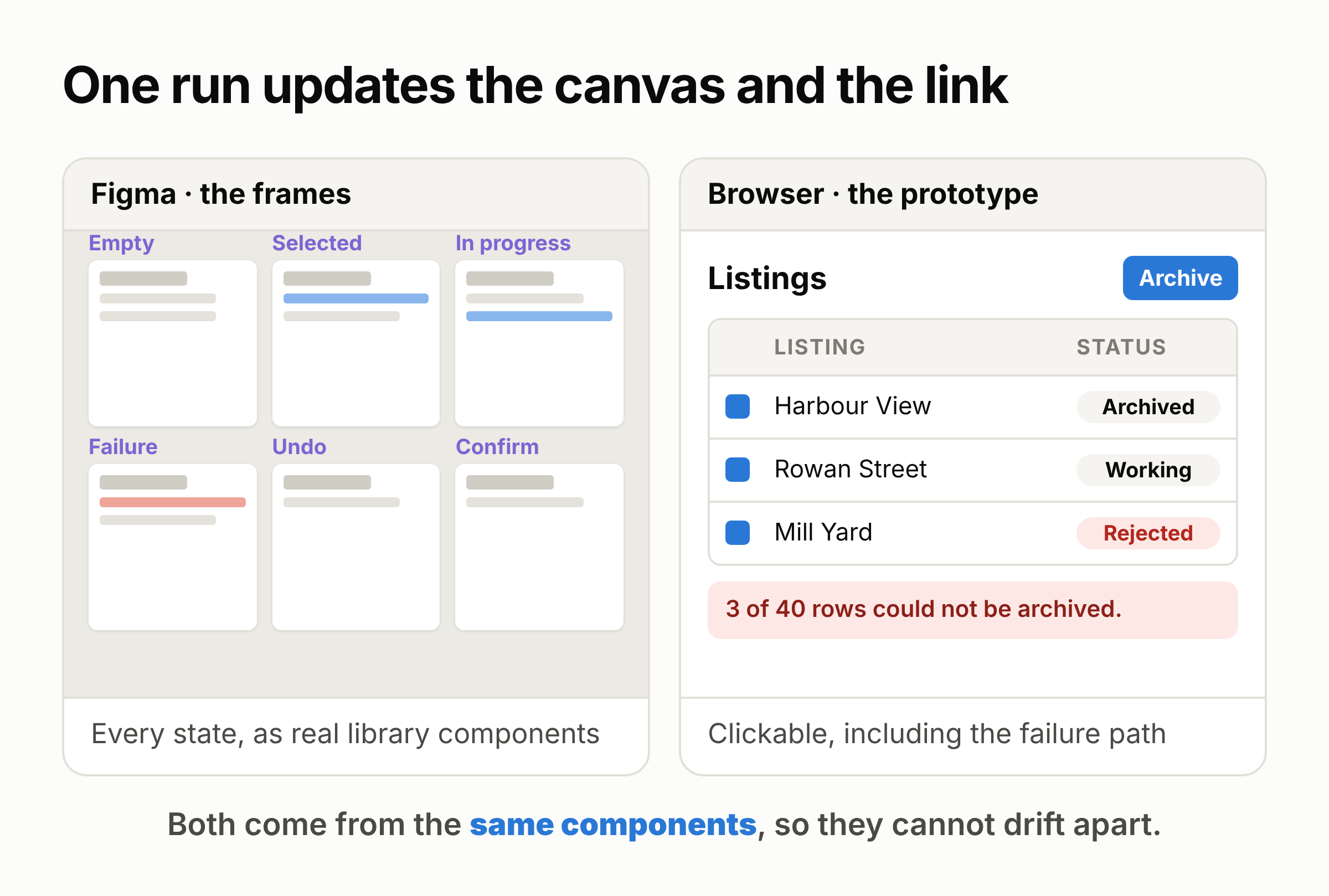
A single run produces frames on the Figma canvas and a working prototype on a link, both from the same components, so they cannot drift apart.
The frames arrive as real library components, so a designer can edit, rename and re-theme them like any other file. The prototype arrives as a branch with a live preview, so anyone in the company can open it, select rows, trigger the failure case and comment on the thing itself instead of on a picture of it.
That changed our review culture more than we expected. On an old platform, the people who know why a rule exists are rarely in the design review. Give them a link and they click it, and the objection arrives in two days instead of two sprints.
Stage 4: developers keep the front end
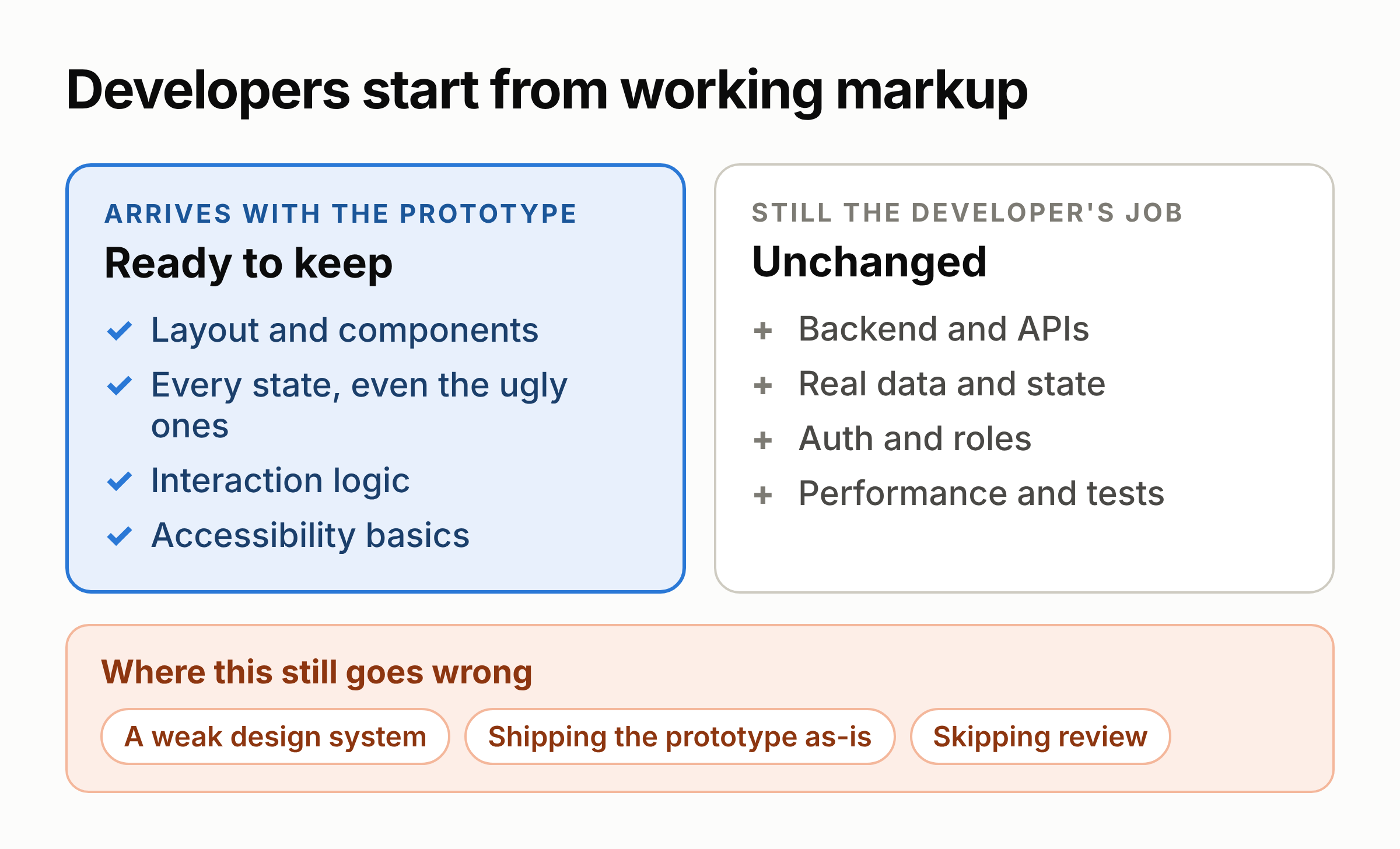
The front end is no longer rebuilt from a static picture. It is taken, kept and wired up. The backend, logins, real data, performance at volume and tests are exactly as much work as before, and we do not claim otherwise. A designer working this way independently describes the same split: a "shadow repo" that mirrors production patterns, Figma MCP for visual direction, and developers who finished the production version "in a single evening" after reading the prototype’s code.
Three things still go wrong, reliably. A weak design system poisons everything, because Claude reproduces its inconsistencies faithfully and much faster, which is why we spent the first six weeks cleaning up the library. Generated is not production, so the prototype repo stays separate, and one team that shipped from it directly paid for it the next sprint. And review does not disappear: someone still reads the diff and checks the frames, and faster output makes sloppy review more expensive, not less.
The results
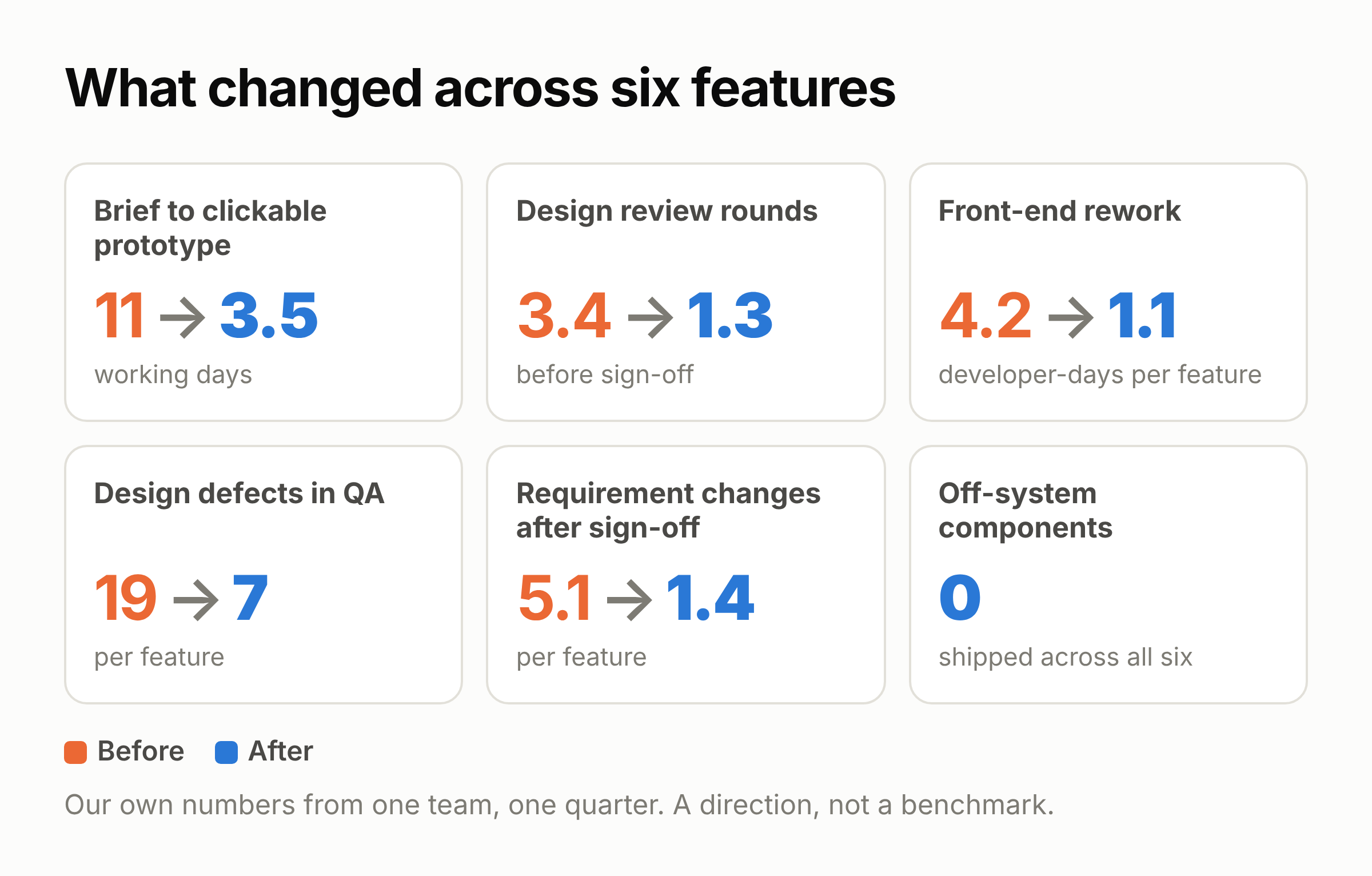
These are our own numbers from one product team on that account, across six features in a quarter. They are a direction, not a benchmark. Your design system and your review culture will move them far more than the tooling will.
The numbers move together because they share one cause. Requirement changes after sign-off dropped by 73%, and the rest follows: fewer late changes, fewer review rounds, less rework, fewer defects. The rework does not get done faster. It mostly never gets created.
Other people’s data points the same way, with a wide spread:
Design to code. Figma’s report on bridging design and code cites a team saving 98 minutes per developer per week, and a 50% cut in development time on some projects, after wiring components to code.
AI-assisted development. A field experiment across roughly 4,800 developers found Copilot users completed 26% more tasks. Nielsen Norman Group’s summary of three controlled studies puts average gains at 66%, with programming highest at 126%.
The counter-evidence. METR’s randomised trial found experienced open-source developers were 19% slower with AI tools, a result METR has since revisited with a weaker, noisier follow-up.
That spread, from +126% to −19%, is not noise. It is the finding. Google’s 2025 DORA report, covering nearly 5,000 practitioners, calls AI "the great amplifier": it makes strong teams faster and struggling teams worse.
What we learned
Settle the details before anything is generated. Our gains did not come from Claude writing code quickly. They came from a requirements session that made the decisions first, and a design system worth generating against.
Start with the design system, not the tooling. If the library is not consistent, fix that first. On a legacy product it is most of the work, and it pays off on its own.
Keep Figma, and keep the prototype separate from production. Figma is the lasting record, and the prototype is evidence, not a finished product.
And measure the boring things: requirement changes after sign-off, days from brief to a clickable link, and developer-days of rework after handoff. If those do not move, the tooling is not the reason.
Figma stays. The handoff document is what died, and nobody at Valor or on the client’s side has missed it.
Further reading
Guide to the Figma MCP Server: setup, local vs remote, write-to-canvas support by client
Design context, everywhere you build: Figma on remote MCP and in-app Code Connect mapping
Using the GitHub MCP server: the other half of the wiring
Code with context: Figma MCP + GitHub Copilot: Figma’s own design-to-code walkthrough
The anatomy of a Three Amigos requirements discovery workshop: John Ferguson Smart on request, suggest, protest
How to write a good spec for AI agents: Addy Osmani, January 2026
The Model Context Protocol (MCP) for designers: orchestrating Figma, data and code
The 2025 DORA Report: AI as "the great amplifier", roughly 5,000 respondents
Bridging the gap between design and code: Figma’s Code Connect time-saving case
AI coding assistants boost productivity by 26%: the MIT, Princeton and Penn field experiment
AI tools: productivity gains: NN/g across three controlled studies
METR: changing our developer productivity experiment design: the 19% slowdown result and its follow-up
Productionizing design prototypes with AI coding tools: a very similar workflow, from the designer’s side